# import
from progeval import ProgEval
How-to guide#
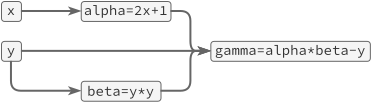
Let’s consider the following computation:
Dynamically construct graph#
The most straight-forward way to define the computational graph is by assigning to a ProgEval() object.
If a callable object is assigned, it is automatically interpreted as specifying how to compute the given quantity.
Dependent quantities are detected based on the argument names of the function.
def compute_alpha(x):
    print(f'computing alpha = 2 * {x} + 1')
    return 2 * x + 1

def compute_beta(y):
    print(f'computing beta = {y} * {y}')
    return y * y
graph = ProgEval()

graph.alpha = compute_alpha
graph.beta = compute_beta
# any callable object works
graph.gamma = lambda alpha, beta, y: alpha * beta - y
Having constructed the graph, we can set input values and compute the outputs
graph.x, graph.y = 3, 4
graph.gamma
computing alpha = 2 * 3 + 1
computing beta = 4 * 4
108
If we request intermediate values now, they are not computed again (note there is no printed message)!
graph.beta
16
Evaluate everything#
We can evluate and collect all quantities in the graph by invoking compute_all_quantities:
graph.compute_all_quantities()
{'alpha': 7, 'beta': 16, 'gamma': 108, 'x': 3, 'y': 4}
Clear cache#
By removing all saved intermediate values, we can force the computational graph to be recomputed in full.
graph.clear_cache()
graph.compute_all_quantities()
computing alpha = 2 * 3 + 1
computing beta = 4 * 4
{'alpha': 7, 'beta': 16, 'gamma': 108, 'x': 3, 'y': 4}
Changing the computational graph#
When we override the input values, only those quantities that depend on the changes will be re-computed (no printed message for alpha):
graph.y = 8
graph.gamma
computing beta = 8 * 8
440
Besides re-assigning values to the inputs, we can also change the structure of the graph itself.
graph.gamma = lambda alpha, beta: alpha - beta
graph.gamma
-57
Disabling recomputation#
If for any reason the re-computation of values is not desired, it can be disabled by specifying track_dependence=False.
In that case, the graph no longer registers which quantities are requested in the different computations.
graph = ProgEval(track_dependence=False)

graph.alpha = compute_alpha
graph.beta = compute_beta
graph.gamma = lambda alpha, beta, y: alpha * beta - y

graph.x, graph.y = 3, 4
graph.gamma
computing alpha = 2 * 3 + 1
computing beta = 4 * 4
108
graph.y = 8
graph.gamma  # now, no change
108
Specifying input arguments#
Above, the inputs to the node functions are derived from their call signature. Instead, it is also possible to explicitly pass their names.
def prod(a, b):
    return a * b

graph = ProgEval()
graph.register('beta', prod, ['y', 'y'])

graph.y = 5
graph.beta
25
Define computations as classes#
Instead of defining computational graphs by assinging nodes to a ProgEval object, we can also define a new class that represents the computation. This can be nice for two reasons:
All functions/quantities are in one place and are registered automatically.
We can easily specify all input values and efficiently creat the corresponding graph.
The only thing we need to do is to sub-class ProgEval.
class MyComputation(ProgEval):

    # this says the function below does not have a `self` argument
    @staticmethod
    def alpha(x):
        print(f'computing alpha = 2 * {x} + 1')
        return 2 * x + 1

    @staticmethod
    def beta(y):
        print(f'computing beta = {y} * {y}')
        return y * y

    @staticmethod
    def gamma(y, alpha, beta):
        print(f'computing gamma = {alpha} * {beta} - {y}')
        return alpha * beta - y
comp = MyComputation()
To evaluate it, we must assign the input values x and y:
comp.x, comp.y = 5, 3
comp.gamma
computing alpha = 2 * 5 + 1
computing beta = 3 * 3
computing gamma = 11 * 9 - 3
96
The strucuture can be made even cleaner by taking the inputs of the computations as inputs when creating the graph.
class MyComputation(ProgEval):

    def __init__(self, x, y):
        super().__init__(x=x, y=y)

    @staticmethod
    def alpha(x):
        print(f'computing alpha = 2 * {x} + 1')
        return 2 * x + 1

    @staticmethod
    def beta(y):
        print(f'computing beta = {y} * {y}')
        return y * y

    @staticmethod
    def gamma(y, alpha, beta):
        print(f'computing gamma = {alpha} * {beta} - {y}')
        return alpha * beta - y
MyComputation(5, 3).gamma
computing alpha = 2 * 5 + 1
computing beta = 3 * 3
computing gamma = 11 * 9 - 3
96
MyComputation(4, 5).gamma
computing alpha = 2 * 4 + 1
computing beta = 5 * 5
computing gamma = 9 * 25 - 5
220
In this setting, recomputation may not be required (since one would just call with different inputs instead of replacing x and y).
Dependency tracking can be turned off by setting class MyComputation(ProgEval, track_dependence=False) in the first line.
Accessing quantities as attributes of self#
In the above examples, the dependencies of quantities were made explicit by the arguments the functions take.
It is also possible to have methods that are not a staticmethod, i.e. that access quantities as attributes of self.
However:
Warning
If a method accesses computational quantities as attributes of self (instead of explicit arguments), the dependencies in the computational graph can currently not be tracked.
That means quantities are not properly recomputed when intermediate values are changed.
This is only a problem if the computational graph is changed, i.e. if nodes are replaced or deleted, after it was created.
class MyComputation(ProgEval):

    def __init__(self, x, y):
        super().__init__(x=x, y=y)

    def alpha(self):
        print(f'computing alpha = 2 * {self.x} + 1')
        return 2 * self.x + 1

    def beta(self):
        print(f'computing beta = {self.y} * {self.y}')
        return self.y * self.y

    def gamma(self):
        print(f'computing gamma = {self.alpha} * {self.beta} - {self.y}')
        return self.alpha * self.beta - self.y
MyComputation(5, 3).gamma
computing alpha = 2 * 5 + 1
computing beta = 3 * 3
computing gamma = 11 * 9 - 3
96
MyComputation(4, 5).gamma
computing alpha = 2 * 4 + 1
computing beta = 5 * 5
computing gamma = 9 * 25 - 5
220
Advanced: transforming functions#
It is possible to specify an optional transformer when constructing the computational graph, which can modify the node functions before they are added.
It must take three arguments: transformer(function, static, name).
The first is the function which is used to compute the quantity with the given name.
static is a boolean value which is false if the function takes self as the first argument.
The output should be a function of the same signature. If the signature is changed, the output must be a tuple of the transformed function and the new signature as an instance of type inspect.Signature.
Below are two examples of how this can be used. They require JAX and Dask to be installed, respectively.
Just in time compilation with JAX#
import jax
def jit_if_static(fun, static, name):
    # only jit compile if the function doesn't depend on self
    if static:
        return jax.jit(fun)
    return fun


class Computation(ProgEval):

    def __init__(self, x, y):
        super().__init__(x=x, y=y)

    @staticmethod
    def alpha(x, y):
        return jax.numpy.trace(x @ x) * jax.numpy.trace(y)

    @staticmethod
    def beta(x, y, alpha):
        return jax.numpy.trace(x @ y) * alpha

    @staticmethod
    def total(alpha, beta):
        return (alpha + beta) / alpha.size
The above construction only makes a noticeable difference if the individual functions are sufficiently costly. Another useful pattern with JAX is that we can define efficient function for parts of the computational tree we are interested in, without repeating code.
@jax.jit
def compute_alpha(x, y):
    return Computation(x, y).alpha

@jax.jit
def compute_beta(x, y):
    return Computation(x, y).beta

@jax.jit
def compute_total(x, y):
    return Computation(x, y).total
rng = jax.random.PRNGKey(0)
x, y = jax.random.normal(rng, (2, 32, 32))

%timeit compute_alpha(x, y).block_until_ready()
8.95 µs ± 71.8 ns per loop (mean ± std. dev. of 7 runs, 100,000 loops each)
WARNING:absl:No GPU/TPU found, falling back to CPU. (Set TF_CPP_MIN_LOG_LEVEL=0 and rerun for more info.)
%timeit compute_beta(x, y).block_until_ready()
11.3 µs ± 37.7 ns per loop (mean ± std. dev. of 7 runs, 100,000 loops each)
%timeit compute_total(x, y).block_until_ready()
12.3 µs ± 80.8 ns per loop (mean ± std. dev. of 7 runs, 100,000 loops each)
Comparing this with a manual implementation, we see that the construction via the computational graph has virtually no cost after jit-compilation.
@jax.jit
def computation(x, y):
    alpha = jax.numpy.trace(x @ x) * jax.numpy.trace(y)
    beta = jax.numpy.trace(x @ y) * alpha
    total = (alpha + beta) / alpha.size
    return total
%timeit computation(x, y).block_until_ready()
12.3 µs ± 9.53 ns per loop (mean ± std. dev. of 7 runs, 100,000 loops each)
Generating Dask delayed objects#
import dask
def delay(fun, _, name):
    return dask.delayed(fun, name)

comp = ProgEval(transformer=delay)

def inc(a):
    return a + 1

def add(a, b):
    return a + b

comp.x = 5
comp.y = 3
comp.register('a', inc, 'x')
comp.register('b', inc, 'y')
comp.register('total', add)

# comp.total.visualize()